One weekend I started wondering what syntax highlighting in Jetpack Compose would look like if I built it from scratch today - no WebView, no HTML template strings. I’d done the WebView + PrismJS/highlight.js approach back in 2020 and it worked, but it always felt a bit awkward to embed a browser engine just to display colored text. Now that Compose is the default UI toolkit, I wanted something that fit in naturally.
That curiosity led me down a rabbit hole involving Shiki, WebAssembly limitations, Cloudflare Workers, a small microservice, and eventually a second approach using TextMate grammars running entirely on-device. Here’s how both ended up working.
Why Shiki?
If you haven’t come across Shiki before, it’s a syntax highlighter based on TextMate grammars and themes - the same engine that powers VS Code’s syntax highlighting. They’re not the same thing, but they share the same underlying approach, which means the output quality is genuinely excellent. Colors match what you’d see in your editor.
The other thing I liked is that it supports dual-theme responses out of the box. You can ask it to tokenize code once and get back both dark and light colors for every token in a single response. That’s perfect for Android apps that respect the system dark/light mode.
The catch? Shiki relies on Oniguruma, a regex engine that gets compiled to WebAssembly at runtime. WebAssembly on Android isn’t something you can just drop into an app - and there’s no native Android port of Shiki. So running Shiki itself on-device isn’t an option - but the TextMate grammar engine it’s built on can run on Android, which turned out to be its own path worth exploring.
Running Shiki server-side
The first approach: if Shiki can’t run on Android, run it somewhere else and just send the result to the app.
I built a small microservice - Shiki Token Service - that takes source code and returns the highlighted tokens as JSON. The app never does any parsing itself; it just receives a list of tokens, each with its text and color, and renders them.
The service is built with Hono and runs on Cloudflare Workers. One interesting wrinkle: Shiki’s default engine loads the Oniguruma WASM binary dynamically at runtime, which doesn’t work in a Workers isolate. The Oniguruma WASM is also large enough (~1.5 MB) that it can push against the script size limit on Cloudflare’s free tier. The fix was to switch to Shiki’s JavaScript regex engine (shiki/engine/javascript), which uses native JS RegExp via Oniguruma-To-ES transpilation instead of loading any WASM. No WASM needed, works in Workers, and cold starts are fast.
The API has three highlight endpoints:
POST /highlight- single theme, returnstext+colorper tokenPOST /highlight/dual- dark + light theme in one call, returnstext+darkColor+lightColorper tokenPOST /highlight/semantic- returns token types (keyword,function,string, etc.) instead of colors, for when you want to manage the palette yourself
I hosted the service at https://syntax-highlight.gohk.xyz/docs. It’s on Cloudflare’s free tier, so latency is low and there’s no cost to keep it running.
Since it’s just a REST API, it works for any client - Android, iOS, or web. I also built a companion iOS demo using the same service with SwiftUI, which follows the same pattern: call the /highlight/dual endpoint, get tokens back, render with AttributedString.
Note
The service is a proof of concept. The response format is intentionally simple - if you’re building something production-ready, you’d likely want to optimize the payload (e.g. compress repeated colors, batch tokens differently) to reduce response size for larger code snippets.
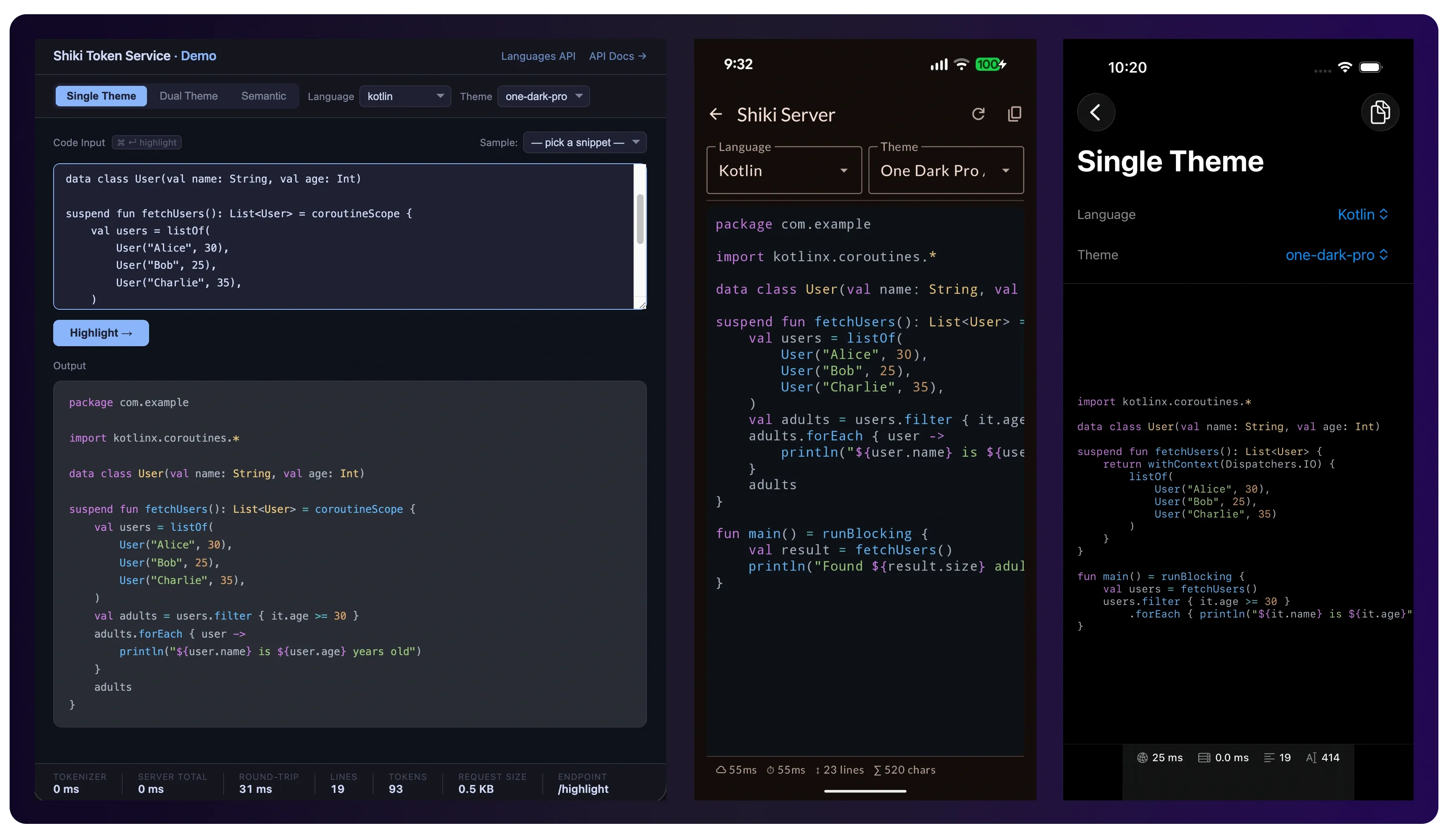
The Android side
The Compose implementation turns out to be pretty clean. The /highlight/dual endpoint returns a HighlightDualResponse containing a 2D array of tokens (lines of tokens), and each token carries a darkColor and lightColor hex string. From there it’s just building a Compose AnnotatedString using a parseHexColor helper:
private fun buildAnnotatedStringFromDualResponse(
    response: HighlightDualResponse,
    isDark: Boolean,
): AnnotatedString = buildAnnotatedString {
    response.tokens.forEachIndexed { lineIndex, line ->
        line.forEach { token ->
            val hex = if (isDark) token.darkColor else token.lightColor
            val color = parseHexColor(hex)
            withStyle(SpanStyle(color = color)) {
                append(token.text)
            }
        }
        if (lineIndex < response.tokens.lastIndex) {
            append("\n")
        }
    }
}

private fun parseHexColor(hex: String): Color {
    val clean = hex.trimStart('#')
    return when (clean.length) {
        // Parses only when it's likely valid HEX color
        6, 8 -> Color(Color.parseColor("#$clean"))
        else -> Color.Unspecified
    }
}
Then rendering it is just:
Text(
    text = annotated,
    style = MaterialTheme.typography.bodySmall.copy(
        fontFamily = FontFamily.Monospace
    )
)
No WebView, no JavaScript bridge, no HTML template string. Just an AnnotatedString in a Text composable - with a background color approximated from the theme. I was pleasantly surprised by how little code this ended up being.
💡 The dual-theme endpoint is worth using even if your app only supports one theme right now. If you ever add dark mode support later, you already have both colors sitting in the response.
The Kotlin SDK
Rather than calling the REST API directly with Retrofit or Ktor, there’s an Android SDK available via JitPack. In the repo, ShikiRepositoryImpl wraps the ShikiClient and exposes a single highlightDual suspend function:
// settings.gradle.kts
dependencyResolutionManagement {
    repositories {
        maven("https://jitpack.io")
    }
}

// build.gradle.kts
dependencies {
    implementation("com.github.hossain-khan.shiki-token-service:sdk-android:sdk-1.0.5")
}
Usage is straightforward - all the client methods are suspend functions and return kotlin.Result<T>:
private val client = ShikiClient(baseUrl = "https://syntax-highlight.gohk.xyz")

suspend fun highlightDual(
    code: String,
    language: String,
    darkTheme: String,
    lightTheme: String,
): Result<HighlightDualResponse> =
    client.highlightDual(
        HighlightDualRequest(
            code = code,
            language = language,
            darkTheme = darkTheme,
            lightTheme = lightTheme,
        ),
    )
And calling it from the presenter:
shikiRepository
    .highlightDual(
        code = selectedSample.code,
        language = selectedSample.language,
        darkTheme = selectedThemePair.dark,
        lightTheme = selectedThemePair.light,
    ).onSuccess { response ->
        // response is HighlightDualResponse
        // pass to UI state, build AnnotatedString on the UI side
    }.onFailure { errorMessage = it.message ?: "Unknown error" }
The SDK uses Ktor with OkHttp under the hood on Android, and kotlinx.serialization for JSON. It’s a Kotlin Multiplatform module, so it works in JVM projects too.
Plain text fallback
One thing worth having in your implementation is a plain-text fallback for when the device is offline or the service is unavailable. In the demo app this is handled by the Error state - it falls back to showing the raw code using the same Text composable but without any AnnotatedString coloring:
when (state) {
    is State.Success -> {
        val isDark = isSystemInDarkTheme()
        val annotated = buildAnnotatedStringFromDualResponse(state.response, isDark)
        Text(
            text = annotated,
            style = MaterialTheme.typography.bodySmall.copy(
                fontFamily = FontFamily.Monospace
            )
        )
    }
    is State.Error -> {
        // plain text fallback when highlighting is unavailable
        Text(
            text = state.selectedSample.code,
            style = MaterialTheme.typography.bodySmall.copy(
                fontFamily = FontFamily.Monospace
            ),
            modifier = Modifier.background(MaterialTheme.colorScheme.surfaceVariant),
        )
    }
}
The demo app shows API latency, line count, and character count alongside the highlighted output - handy for getting a feel for how the service performs on real devices.
On-device with kotlin-textmate library
While I was building the server-driven approach I also came across kotlin-textmate - a Kotlin/JVM port of vscode-textmate, the exact same tokenizer library VS Code uses. Since Shiki is built on the same TextMate grammar format and themes, the output quality is essentially the same. The difference is that everything runs on-device with zero network calls.
The setup is a bit different from the Shiki approach. Grammar files (.tmLanguage.json) and theme files ship in the app’s assets/ folder. At runtime you load them from there, hand them to CodeHighlighter, and call highlight():
// Load grammar and theme from assets (do this on a background thread)
val grammar = GrammarReader.readGrammar(
    assets.open("grammars/kotlin.tmLanguage.json")
)
val theme = ThemeReader.readTheme(
    assets.open("themes/dark_vs.json"),
    assets.open("themes/dark_plus.json"),
)

// Tokenize entirely on-device - no network call
val annotated = CodeHighlighter(grammar, theme).highlight(code)

// Render exactly the same way as the server approach
Text(
    text = annotated,
    style = MaterialTheme.typography.bodySmall.copy(
        fontFamily = FontFamily.Monospace
    )
)
The highlight() call returns a Compose AnnotatedString directly - same as what the Shiki path produces. So the rendering layer is identical; only the data source changes.
The honest tradeoff here is APK size. Grammar and theme files add a few hundred KB per language, which can add up if you need broad language support. For a few well-known languages it’s not a problem at all.
A few things to know before reaching for it: injection grammars aren’t supported (so embedded languages like HTML inside JSX won’t get sub-grammar highlighting), it isn’t thread-safe (don’t share a Grammar instance across coroutines without synchronization), and it retokenizes the full file on every call with no incremental state cache. For displaying static code snippets those limitations don’t matter much - it works great. For a full code editor you’d want to add your own caching on top of tokenizeLine().
💡
kotlin-textmateis bundled as local JARs in the demo app (app/libs/) since it isn’t currently published to Maven Central or JitPack. Check the repo’sapp/libs/directory for the JARs.
Compared to the old approach
The WebView approach from 2020 still works - and if you need to support older Views-based layouts, it’s still a reasonable option. But having now tried three different approaches, the Compose-native options are noticeably cleaner. No WebView overhead, rendering is pure Compose, and since the result is just an AnnotatedString it behaves like any other text - you can select it, layer more spans on top, put it inside a LazyColumn, whatever.
Between the two Compose paths:
- The server-driven Shiki approach is easier to set up. No grammar files to manage, language/theme support is handled server-side, and you get the full Shiki theme catalog. The tradeoff is the network dependency - it adds latency and needs a fallback for offline use.
- The on-device TextMate approach is the right call when offline support matters or when you want zero latency (think keystroke-level feedback in a code editor). Grammar files add a bit to APK size, but for a handful of languages that’s usually fine.
Both produce the same AnnotatedString and render through the same Text composable, so switching between them is mostly a data-layer swap.
All three projects are available on GitHub. The token service repo also has a KMP SDK in the sdk/ directory if you want to dig into how it’s structured.
shiki-token-service
Lightweight Shiki powered syntax-highlighting API mircoservice for Android & iOS mobile applications
android-syntax-highlighter-compose
Explore different source code syntax highlighting options available in Jetpack Compose
ios-syntax-highlighter-swift
Experimental project to explore TextMate grammar based syntax highlighting
If something’s not working or you run into issues, drop a comment or open a GitHub issue. Hope it helps somebody. ✌️