Recently, I used Zensical for my new Compose Highlight library and noticed Kotlin syntax highlighting was not fully accurate. I did a quick search to see whether I could change the highlighting pipeline on a Zensical site, but I could not find much documentation. Then I asked in the Discord community, and someone shared a helpful clue in this thread: Shiki highlighting discussion. That pointed me to a Shiki-based JavaScript approach that worked really well.
My Zensical based docs site already had build-time highlighting with Pygments which for most Kotlin code blocks was good enough, but I wanted to see if I could improve it without breaking the existing setup.
In this post, I will share how I added Shiki support for Kotlin code blocks without breaking Zensical’s existing code block UI.
Important
Zensical is still in an early stage. At the time of writing this post, the current release is 0.0.43. There may be a native way to handle this in a future release, so treat this approach as a practical workaround for now.
The highlighting overhaul
Based on the hint provided on the Discord site, I took a hybrid approach:
- Keep Pygments as the default highlighter for all languages at build time.
- Re-highlight only Kotlin blocks on the client side with Shiki.
- Preserve the existing
<pre>and wrapper structure so copy buttons and layout keep working.
That gave me better Kotlin tokenization while keeping the stability of the current Zensical pipeline.
💡 Tip: If your docs site already has working build-time highlighting, this incremental approach is much safer than swapping the whole highlighting system in one go.
Technical details
Here are the key changes made to achieve the new highlighting on top of Pygments:
docs/javascripts/shiki-kotlin.js(new)docs/stylesheets/shiki-kotlin.css(new)zensical.toml(updated to load both assets)
The script scans code blocks, detects Kotlin blocks, asks Shiki to render highlighted HTML, and then swaps only the inner <code> content.
That “swap only inner HTML” decision mattered a lot because Zensical’s existing wrappers handle extra UI behavior (like copy actions). Replacing the whole block would have been risky.
Here is the complete implementation of the highlighting script:
import { codeToHtml } from "https://esm.sh/shiki@4.1.0";

// Finds Kotlin code blocks rendered by Pygments and re-highlights them with Shiki.
// Only swaps inner <code> content - preserves the <pre> and wrapper <div> so that
// Zensical's copy buttons, positioning, and background styling remain intact.
async function highlightKotlinBlocks() {
  const wrappers = document.querySelectorAll(
    "div.language-kotlin.highlight, div.language-kt.highlight"
  );

  if (wrappers.length === 0) return;

  for (const wrapper of wrappers) {
    if (wrapper.hasAttribute("data-shiki-done")) continue;

    const pre = wrapper.querySelector("pre");
    if (!pre) continue;

    const block = pre.querySelector("code");
    if (!block) continue;

    const code = block.textContent;

    try {
      const html = await codeToHtml(code, {
        lang: "kotlin",
        themes: {
          light: "one-light",
          dark: "one-dark-pro",
        },
        defaultColor: false,
      });

      const tempDiv = document.createElement("div");
      tempDiv.innerHTML = html;

      const shikiPre = tempDiv.querySelector("pre");
      if (!shikiPre) continue;

      const shikiCode = shikiPre.querySelector("code");
      if (!shikiCode) continue;

      // Swap just the code innerHTML and apply Shiki's CSS variables to existing elements.
      block.innerHTML = shikiCode.innerHTML;

      // Apply Shiki's CSS custom properties to the pre without removing existing styles
      const shikiStyle = shikiPre.getAttribute("style") || "";
      const cssVars = shikiStyle.match(/--shiki[^;]+;?/g) || [];
      pre.style.cssText += cssVars.join("");
      pre.setAttribute("data-shiki", "true");

      wrapper.setAttribute("data-shiki-done", "true");
    } catch (e) {
      console.warn("[shiki-kotlin] Failed to highlight block:", e);
    }
  }
}

// Run on initial page load
highlightKotlinBlocks();

// Re-run on SPA navigation (Zensical/Material instant navigation)
if (typeof document$ !== "undefined") {
  document$.subscribe(() => highlightKotlinBlocks());
} else {
  const waitForDocStream = setInterval(() => {
    if (typeof document$ !== "undefined") {
      document$.subscribe(() => highlightKotlinBlocks());
      clearInterval(waitForDocStream);
    }
  }, 200);
  setTimeout(() => clearInterval(waitForDocStream), 10000);
}
I also wired this into Zensical’s SPA navigation lifecycle, using a robust subscription check to ensure highlighting still runs reliably after route transitions.
The related issue and PR are here:
Theme and CSS notes
For theming, I used Shiki’s CSS variables with defaultColor: false. That embeds both light and dark token values as variables, so theme switching is instant.
I also added a CSS fix for light/dark mode and blank-line rendering. The line wrappers can collapse visually if you do not style them explicitly:
/* Shiki-highlighted Kotlin code blocks */

/* Ensure Shiki's line spans render as blocks so blank lines are visible */
pre[data-shiki] code .line {
  display: block;
  min-height: 1.45em;
}

/* Light mode: use --shiki-light colors on spans */
[data-md-color-scheme="default"] pre[data-shiki] span {
  color: var(--shiki-light) !important;
}

/* Dark mode: use --shiki-dark colors on spans */
[data-md-color-scheme="slate"] pre[data-shiki] span {
  color: var(--shiki-dark) !important;
}
Nothing fancy here, but this CSS snippet handles both line spacing and theme integration seamlessly.
A few issues I ran into
Sharing some issues I encountered during this process in case they help in your journey to do the same using AI Agents
- Kotlin blocks did not re-highlight on client-side navigation until I subscribed to the SPA transition hook.
- Replacing the entire
<pre>broke some existing code block behavior. - Without
defaultColor: false, light/dark switching was not as smooth as I wanted. - I first tried selecting
code.language-kotlin, then noticed Zensical puts the language class on the wrapper div (div.language-kotlin.highlight), so selector targeting matters. - If I applied Shiki background color vars to
<pre>, Zensical’s code block background looked wrong and copy buttons felt visually detached. - Shiki wraps lines in
.linespans, and blank lines collapsed until I forced block rendering with a minimum line height.
If you hit similar issues, start by preserving existing DOM wrappers and replacing only the minimum possible HTML.
💡 Tip: Two things gave me the cleanest result - keep Zensical in charge of the code block container styles, and let Shiki handle token colors only.
Final result
After this update, Kotlin snippets are much more readable on my docs site, especially for newer syntax and mixed DSL-style code.
Here is a demo of the new highlighting in action:
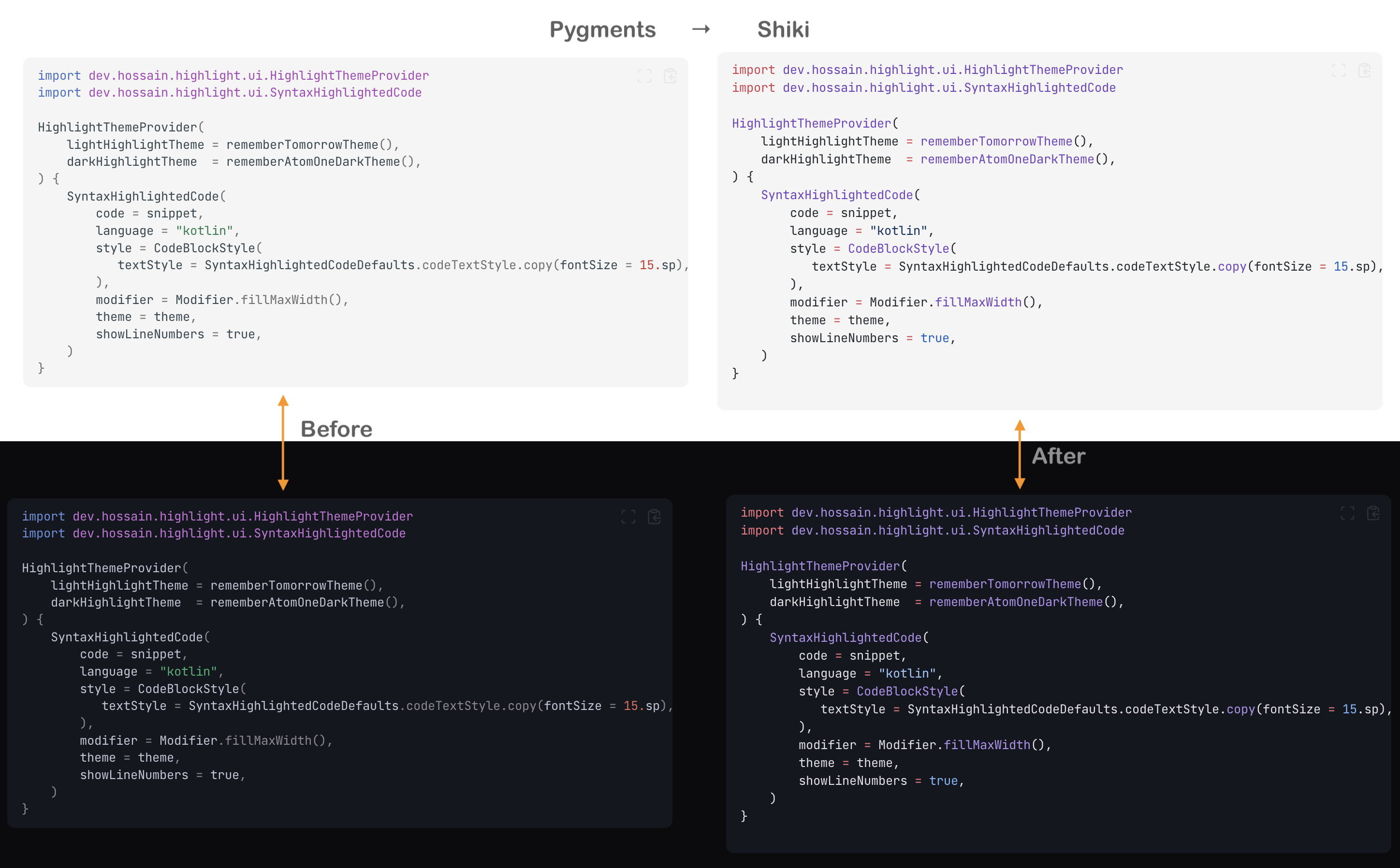
Overall, I am very happy with the outcome, even if there is a split second of “flash” when the page loads and Shiki re-highlights. Let me know if you do try this approach or have any questions about the implementation! Cheers ✌️