Recently I’ve been on a bit of a syntax highlighting journey on Android.
While in part 1 both cloud-based and on-device highlighting worked, I was wondering how modern apps like ChatGPT, Claude, and Perplexity handle source code highlighting on Android.
Their code blocks UI look great - proper colors, correct token boundaries, clean rendering. I was curious to know how they have done it, so I peeked inside their apps using good old apktool.
The answer was surprisingly simple, those apps uses Highlight.js running inside a hidden WebView. The tokenized HTML output like <span class="hljs-*"> elements is then parsed and mapped to native Compose AnnotatedString spans.
The WebView never actually renders anything visible. It just does the parsing work in the background, and the result is fully native text that supports real text selection and accessibility and more out of the box.
This finding was interesting enough that I decided to experiment with it and build a proof-of-concept library for Jetpack Compose along with sample app to showcase the usage.
android-compose-highlight
Simple lightweight library that leverages JS bridge to bring fast syntax highlighting to Android Jetpack Compose
Why this instead of other approaches
I’ve explored this space before. Back in 2020 I wrote about using PrismJS directly in a WebView - the full rendering approach where you load an HTML page with the highlighted code and display it inside WebView. It works, but it means you’re embedding a browser renderer just to show colored text. You lose native text selection, accessibility is awkward, and scrolling behavior can be unpredictable.
More recently I explored Shiki running server-side via Cloudflare Workers, which gives genuinely excellent output quality. But it requires a network call, adds latency, and means your app has a hard dependency on an external service.
This library takes a middle path - it keeps everything on-device, uses a battle-tested JS highlighter (Highlight.js supports 190+ languages), and produces native Compose text. The WebView is completely hidden and acts purely as a JS execution engine.
The basic usage
Wrap your screen in HighlightThemeProvider, then drop SyntaxHighlightedCode wherever you need it:
HighlightThemeProvider(
    lightHighlightTheme = rememberTomorrowTheme(),
    darkHighlightTheme  = rememberAtomOneDarkTheme(),
) {
    SyntaxHighlightedCode(
        code            = myCode,
        language        = "kotlin",
        showLineNumbers = true,
    )
}
HighlightThemeProvider reads isSystemInDarkTheme() automatically and picks the right theme. You can pass darkTheme = true/false to force a specific mode.
The composable comes with a few useful parameters out of the box - a language badge in the header and a copy-to-clipboard button are on by default, while line numbers are off (pass showLineNumbers = true to enable them). The copy button does not show a built-in “Copied!” flash - you own that feedback. Pass an onCopyClick lambda to hook in a Snackbar, Toast, or your own animation. You can also supply a custom composable for the copy action via the copyButton slot.
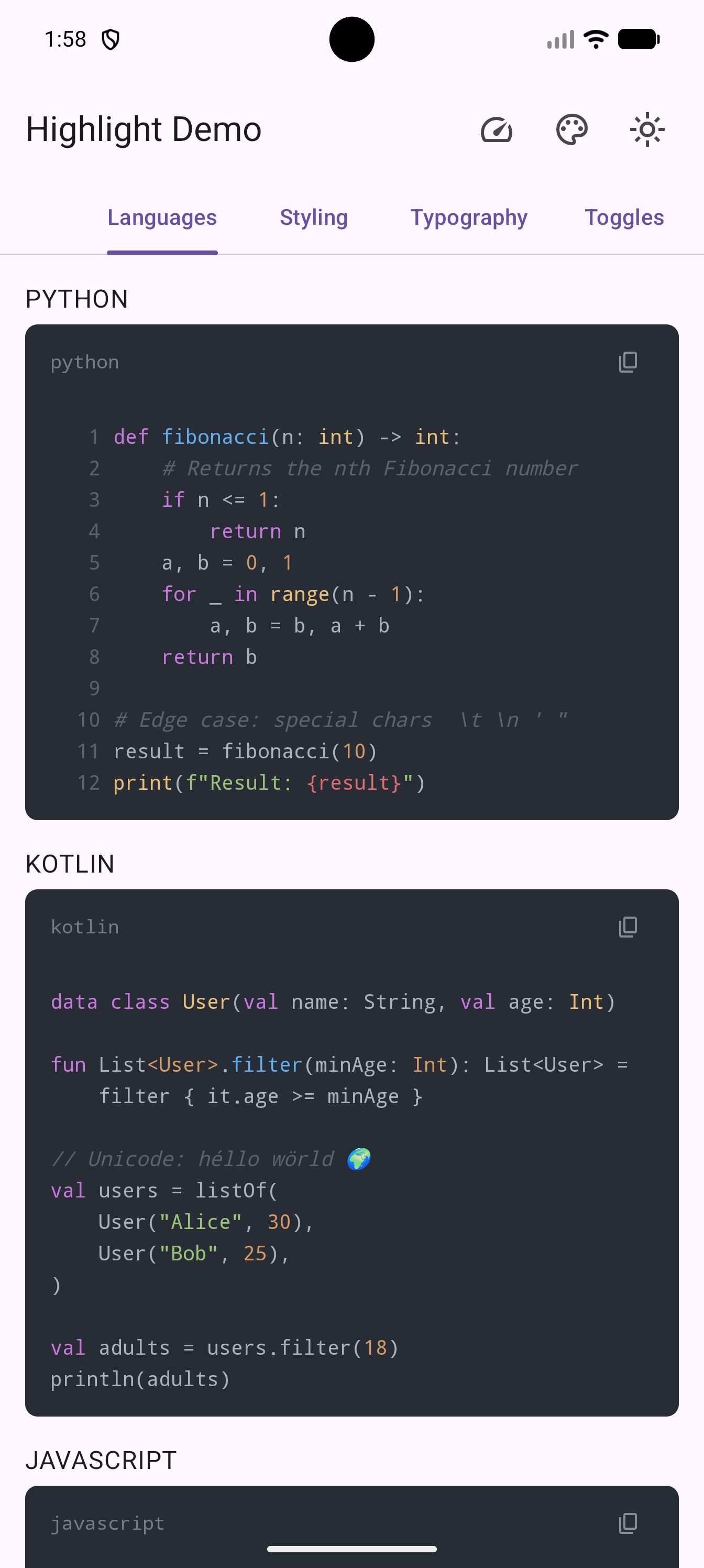
The shared WebView design
One thing I wanted to get right early was the WebView lifecycle. A naive implementation would spin up a new WebView for every SyntaxHighlightedCode block on screen, which would be slow (~200ms warm-up each) and memory-hungry (~2-4MB per WebView).
Instead, HighlightThemeProvider creates a single shared HighlightEngine for its entire subtree. All SyntaxHighlightedCode blocks within that provider share one hidden WebView. A Mutex serializes the JS calls so requests don’t collide. This means a screen with ten code blocks is nearly as fast as one with a single block.
The WebView loads bridge.html from the library’s bundled assets, which in turn loads the full Highlight.js bundle. All WebView operations run on the main thread but the suspend functions let callers interact from any coroutine scope.
The library ships with four bundled themes (two light, two dark) and supports custom themes via asset files, raw CSS, or a fromColorMap factory that’s handy for wiring up Material 3 dynamic colors.
Font family, size, and line height are controlled via CodeBlockStyle.textStyle. Start from SyntaxHighlightedCodeDefaults.codeTextStyle and override just the properties you need:
SyntaxHighlightedCode(
    code     = snippet,
    language = "kotlin",
    style    = CodeBlockStyle(
        textStyle = SyntaxHighlightedCodeDefaults.codeTextStyle.copy(
            fontSize   = 15.sp,
            lineHeight = 24.sp,
        ),
    ),
)
Using the engine directly
If you need an AnnotatedString but don’t want the full composable UI, you can use HighlightEngine directly:
val engine = HighlightEngine(context.applicationContext)

viewModelScope.launch {
    engine.initialize().onFailure { /* handle WebView init failure */ } // warms up the WebView

    val result: Result<HighlightResult> =
        engine.highlight(code = "val x = 42", language = "kotlin", theme = HighlightTheme.tomorrow())

    result.onSuccess { highlighted ->
        val annotated = highlighted.annotated // AnnotatedString
        // use in your own composable
    }

    engine.destroy()
}
There’s also highlightBothThemes() if you want to do a single JS call and get both light and dark versions back at once - handy if you’re building something that needs to handle theme switching without triggering a re-highlight.
You can also introspect the bundled Highlight.js at runtime:
engine.highlightJsVersion().onSuccess { version -> Log.d("HL", "Highlight.js $version") }
engine.supportedLanguages().onSuccess { langs -> Log.d("HL", "${langs.size} languages available") }
engine.isInitialized is a StateFlow<Boolean> that turns true once the hidden WebView has finished loading. Compose UIs can observe it reactively:
val isReady by engine.isInitialized.collectAsState()The remember helpers
For the common case of highlighting inside a composable, two helpers are included:
// single theme — must be inside a HighlightThemeProvider (or pass an explicit theme parameter)
HighlightThemeProvider(
    lightHighlightTheme = rememberTomorrowTheme(),
    darkHighlightTheme  = rememberAtomOneDarkTheme(),
) {
    val highlighted by rememberHighlightedCode(
        code     = snippet,
        language = "kotlin",
        onHighlightComplete = { result ->
            // result.timings has per-stage Duration fields: jsBridge, htmlParse, treeWalk, etc.
            Log.d("Perf", "Highlighted in ${result.durationMs}ms " +
                "(JS: ${result.timings.jsBridge.inWholeMilliseconds}ms, " +
                "parse: ${result.timings.htmlParse.inWholeMilliseconds}ms)")
        },
    )
    Text(text = highlighted ?: AnnotatedString(snippet))
}
// both themes at once - theme switching is instant after first highlight
val result by rememberHighlightedCodeBothThemes(
code = snippet,
language = "kotlin",
lightTheme = rememberTomorrowTheme(),
darkTheme = rememberTomorrowNightTheme(),
)
Text(text = (if (isDark) result?.dark else result?.light) ?: AnnotatedString(snippet))rememberHighlightedCodeBothThemes is the better default if your app respects system dark/light mode - the initial highlight takes one JS call instead of two, and toggling dark mode afterward is instant since both versions are already cached.
How fast is it?
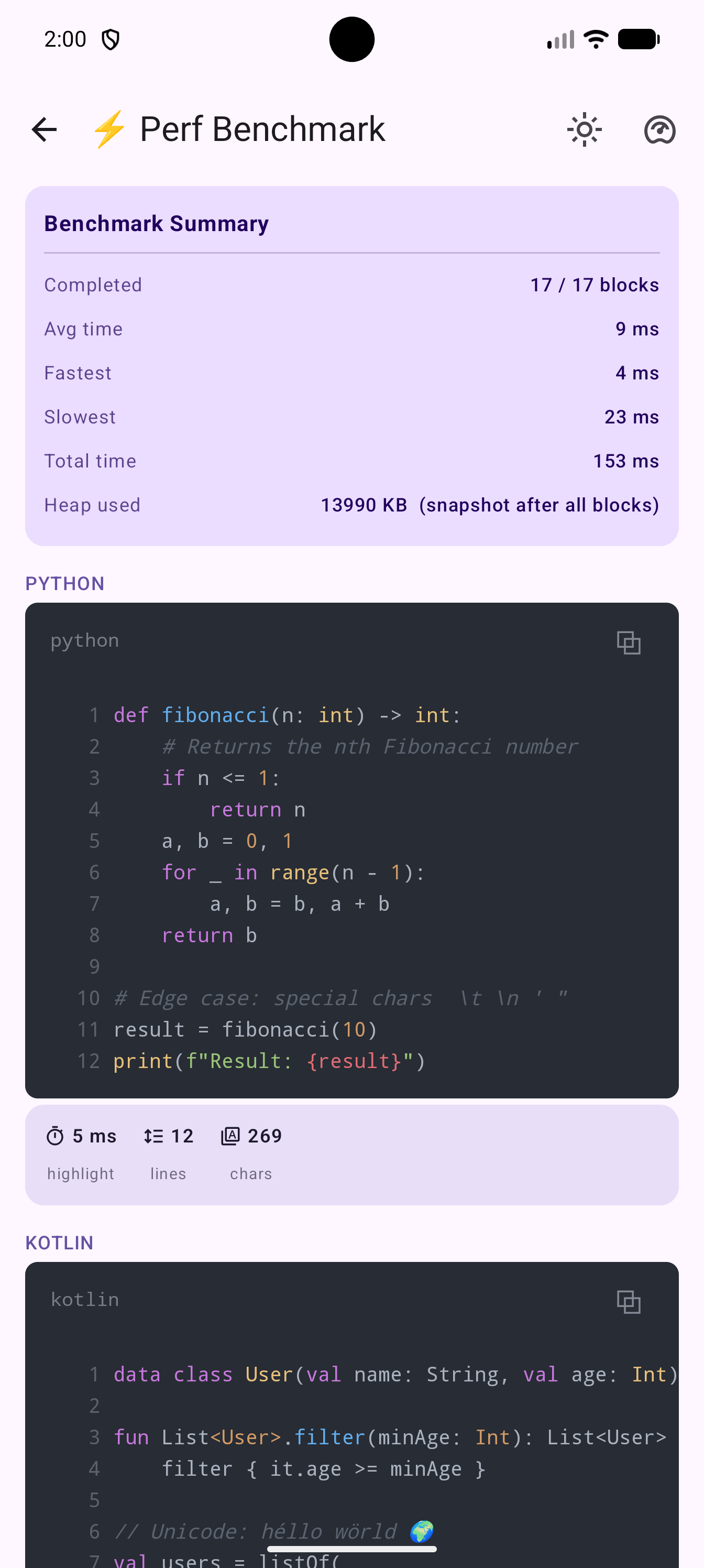
I added microbenchmarks using the AndroidX Benchmark library to measure the three pipeline stages. Running on a Pixel 9 Pro XL (debuggable build):
Highlight Performance (Pixel 9 Pro XL, debuggable)
| Code | Median |
|---|---|
| Python snippet | 7.5 ms |
| Kotlin snippet | 8.7 ms |
| SQL snippet | 8.3 ms |
| ~150-line Kotlin file | 18.8 ms |
| ~200-line TypeScript file | 17.6 ms |
The dominant cost is the WebView JS round-trip. ThemeParser (CSS parsing) and HtmlToAnnotatedString (jsoup conversion) are sub-millisecond individually. Even large real-world files come in under 20ms, and results are cached per rememberHighlightedCode call so subsequent renders are free.
💡 To reduce first-call latency, you can pre-warm the WebView renderer in
Application.onCreate()usingWebViewCompat.startUpWebView()fromandroidx.webkit:webkit:1.16+- which is already a transitive dependency of this library.
APK size impact
Performance numbers are one side of the cost equation - the other is how much the library adds to your APK. I measured this using diffuse against an enriched baseline app - a realistic single activity app that already uses WebView, LazyColumn, Canvas, and animations - so the delta reflects only what compose-highlight library actually brings in.
True Library Impact (with-library vs baseline app)
Compared against a realistic basic app that already uses WebView, LazyColumn, Canvas, and animations.
The bulk of the size increase comes from the bundled Highlight.js asset (~308 KB) and the dex code for the library itself (~235 KB). The per-category breakdown:
Release Build Breakdown
| Category | Baseline App | With Library | Delta |
|---|---|---|---|
| dex | 826.1 KB | 1 MB | +235.9 KB |
| arsc | 70.2 KB | 79.3 KB | +9.1 KB |
| manifest | 1.7 KB | 1.7 KB | -32B |
| res | 36.4 KB | 36.4 KB | +6B |
| native | 84.4 KB | 91.4 KB | +7 KB |
| asset | 3.9 KB | 312.5 KB | +308.6 KB |
| other | 45.2 KB | 46 KB | +780B |
| TOTAL | 1 MB | 1.6 MB | +561.4 KB |
The ~309 KB asset delta is entirely the bundled highlight.min.js and few theme files. That is a real cost, though it compresses well in a release APK and is only loaded once during the shared HighlightEngine warm-up. If you were already shipping a WebView-heavy app, the marginal cost is lower than these numbers suggest - WebView itself is a system component and not included here.
What’s new since this post
The library has evolved significantly since this article was published. Check out the CHANGELOG for the full history, but here are a few highlights added in recent versions:
- Live highlighted editor (experimental) -
SyntaxHighlightedTextEditorandrememberSyntaxHighlightedEditorValueadd a real-time editing experience with debounced highlighting while preserving cursor and selection. - Automatic language detection —
HighlightEngine.highlightAuto()detects the language for you when it’s not known ahead of time. - Language discovery APIs —
HighlightEngine.getLanguage()andHighlightLanguage.fromExtension()help validate and resolve language identifiers without a WebView round-trip. - Better error handling —
onErrorcallbacks onSyntaxHighlightedCodeandrememberHighlightedCodelet you react to failures (timeout, JS errors, WebView unavailability) while still showing a plain-text fallback. - Custom loading states — a new
placeholderslot onSyntaxHighlightedCodelets you render a shimmer, dimmed text, or any composable while highlighting is in progress. - Performance improvements — HTML parsing and theme resolution now run off the main thread on
Dispatchers.Default, andhighlightBothThemesparses the HTML only once. - Robustness fixes — CSS4
rgb()syntax support, proper emoji/surrogate pair handling, and stricter control character escaping.
Most code examples in this post still work as written. A few API names evolved over recent releases (for example custom copy slot naming and theme factory convenience APIs). For the latest API reference, see the official docs.
Wrapping up
I am surprised how well this works and no wonder those modern AI chat apps uses this technique in their apps. I am very happy that I turned this into a library I can actually use in my own projects. The WebView-as-JS-engine pattern is not new, but packaging it cleanly with proper lifecycle management, theme support, and Compose integration turned out to be a worthwhile experiment.
If you try it and run into issues, open a GitHub issue or feel free to ping me on Bluesky. Happy highlighting! ✌️