I’ve been experimenting with an on-device LLM that can help with different programming languages and provide code snippets along with explanations.
So, naturally I wanted to plug in my compose-highlight library to render code snippets in my AI Chat App.
Initial integration
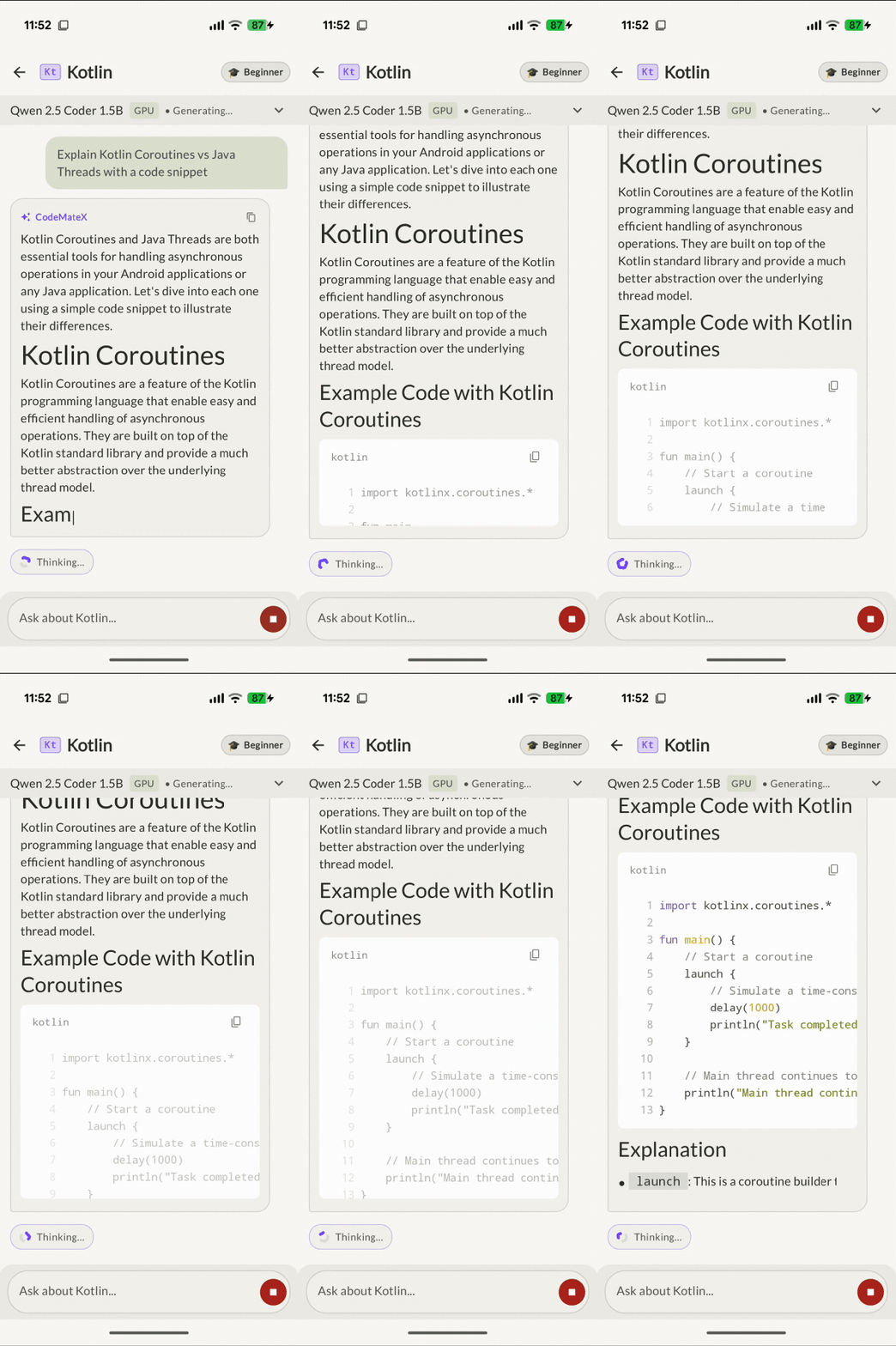
I was using Mike Penz’s multiplatform-markdown-renderer to render streaming markdown content, along with its code rendering plugin.
Replacing the markdown code renderer was straightforward, starting with replacing multiplatform-markdown-renderer-code plugin with dev.hossain:compose-highlight:0.33.0 in the project.
And then I updated some glue code so that the SyntaxHighlightedCode is used for syntax highlighting.
@Composable
private fun ChatMarkdownCodeFence(
    content: String,
    node: ASTNode,
) {
    val (languageTag, codeBlockContent) = extractCodeFenceInfo(content, node)
    SyntaxHighlightedCode(
        code = codeBlockContent,
        language = languageTag.ifEmpty { "text" },
    )
}
I ran the app and the highlighting kinda worked, with some caveats 😅
When static highlighting meets ~20 tokens a second
When an LLM generates a response, it streams tokens piece by piece at 10 to 30 tokens/sec. In Compose, that means the codeBlockContent string property updates multiple times every second.
The SyntaxHighlightedCode was designed under the assumption of static or occasionally updated snippets. So, clearly the initial attempt failed with flashing highlighting almost every 100ms. Not a great experience.
Borrowing an idea from the text editor
While staring at the flashing code blocks, I remembered that I had already dealt with a very similar problem earlier when building SyntaxHighlightedTextEditor.
In an interactive code editor, you can’t run full syntax highlighting on every single keystroke. The editor solved this by snapshotting the styled spans: as you type, new keystrokes render immediately, while previously styled text keeps its spans until debounce pass catches up.
Instead of inventing something complex from scratch for streaming text, I ported that snapshotting concept over to create StreamingSyntaxHighlightedCode:
- As each new token arrives, the text updates on screen immediately with 0 ms UI delay.
- The highlighting pass is run only when the debounce delay passes.
- The previous lines retain their syntax coloring from the last snapshot, so there’s zero visual reset or flash back to plain text.
The newline-based highlight trigger
Originally, the plan was simple: debounce the highlight call by 200 ms, expecting the engine to highlight when the model pauses or takes a breath.
In practice, that didn’t work. The LLM streams tokens so continuously (every 30 to 100 ms) that the 200 ms debounce timer was constantly reset. Because the idle threshold was never reached during active generation, highlighting only happened at the very end when the code block closed.
Then, a simple optimization was applied: send highlight request after newline characters. Even while tokens stream continuously, a newline character (\n) signals that a previous line is structurally complete. Keywords, variable names, and string literals on that line aren’t going to change anymore.
I added newline-aware triggering with progressive backfilling:
As the model streams code:
- New characters appear instantly on the active line.
- The moment the model hits newline character (
\n), that completed line gets queued for syntax highlighting. - By the time the reader looks up at the previous line, it has already snapped into full syntax colors, even while the cursor is busily generating the next line below it.
Bringing it back into the AI chat app
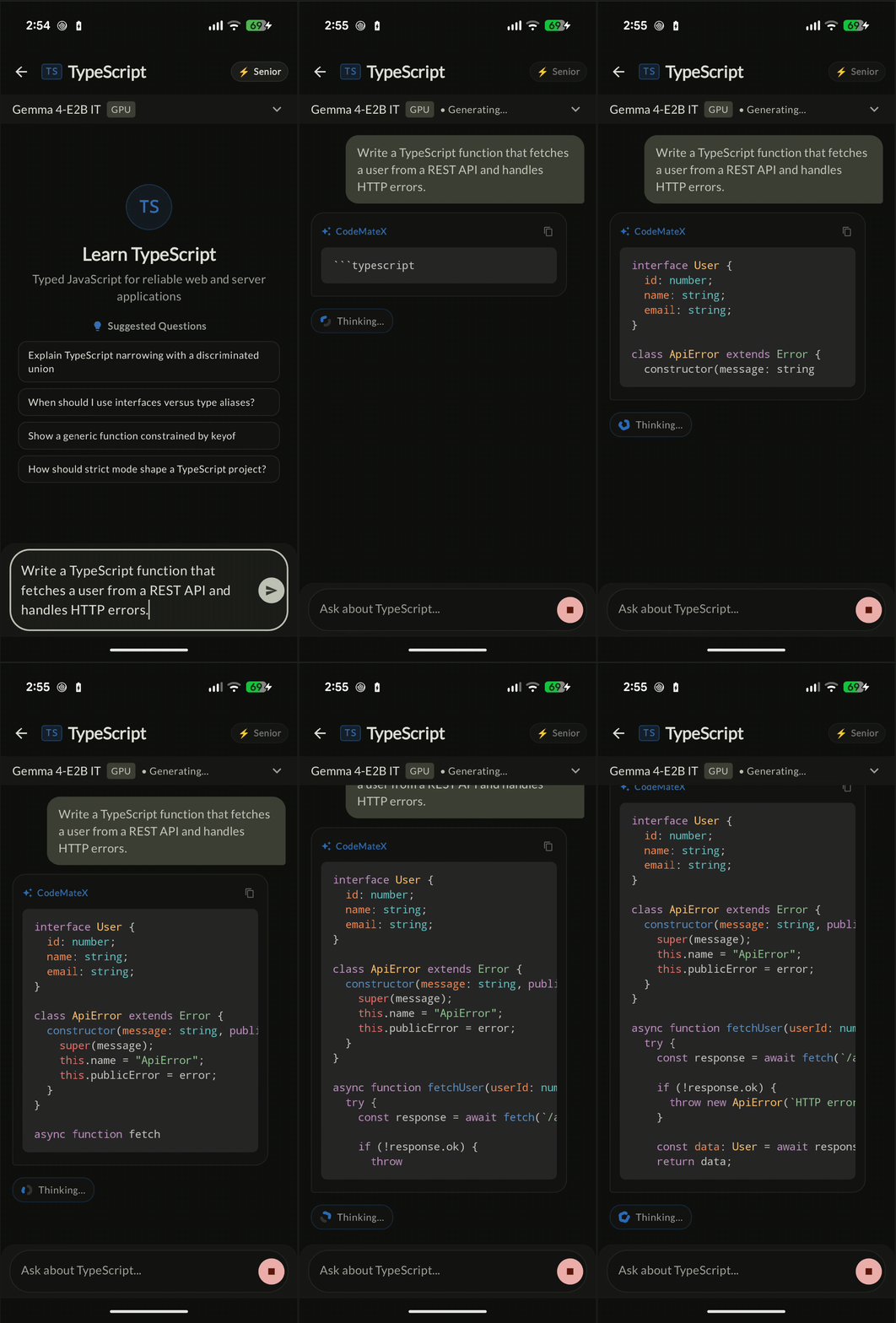
With new version of compose-highlight published, I swapped out the old composable with new streaming supported highlighting:
@OptIn(ExperimentalHighlightApi::class)
StreamingSyntaxHighlightedCode(
    code = codeBlockContent,
    language = languageTag,
    debounceMs = 200L, // Debounce for regular update in the code block
    triggerOnNewline = true, // By default all consumers will get this treatment
    minThrottleMs = 150L // Prevents overloading the engine during rapid bursts of new-lines.
)
After this change the syntax highlighting worked as expected. No frame drops, no flickering re-renders, and no unstyled text waiting around until the response ends. Code streams in smoothly, with prior lines progressively colored in the background.
Wrapping up
Dogfooding my own library in real applications is humbling. On paper, SyntaxHighlightedCode did work for static code snippets. But the moment I plugged it into a streaming AI scenario, it presented new challenges! 🤓
With the release of StreamingSyntaxHighlightedCode, now compose-highlight can be used for streaming code snippets as well! 🙌🏽
If you’re building an AI chat app or any Compose interface that streams formatted code, check out the streaming documentation and give it a spin. If you run into edge cases or have feedback, please open an issue on GitHub.
🎨 Happy highlighting!
android-compose-highlight
Simple lightweight library that leverages JS bridge to bring fast syntax highlighting to Android Jetpack Compose